
Disclosure: This page contains affiliate links. Links to Candy AI and ourdream.ai are affiliate links: we may earn a commission if you sign up or buy through them, at no extra cost to you. Links to other apps are not affiliate links. Affiliate disclosure | Adults only (18+)
How to Cancel Replika (Every Platform)
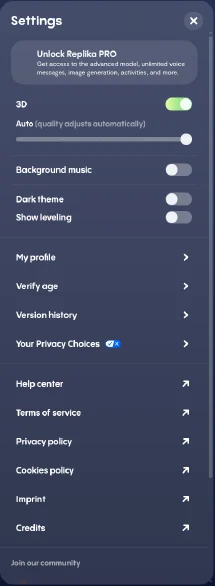
Checked Oct 26, 2026 against Replika's help center and a free Replika web account. Cancel screens only appear on paid accounts, so the screenshots below show a free account's settings.
Short answer: cancel in the same place you subscribed. Deleting the app or your account does not stop billing.
Cancel on iPhone or iPad
- Open Settings and tap your name.
- Tap Subscriptions.
- Tap Replika, then Cancel Subscription.
Cancel on Android
- Open the Google Play Store.
- Tap your profile icon, then Payments & subscriptions, then Subscriptions.
- Tap Replika, then Cancel subscription.
Cancel on the Web (Subscribed at replika.com)
- Log in at replika.com.
- Click the gear icon to open Settings.
- Use the subscription option shown to paid accounts to cancel. A free account's Settings has no subscription or cancel entry, only Unlock Replika PRO, My profile and other settings. If you're paying and still don't see one, contact Replika through Help center in Settings.
Cancel a PayPal Subscription
PayPal > Settings > Payments > Manage automatic payments > Replika > Cancel.
Deleting Your Replika Is Separate
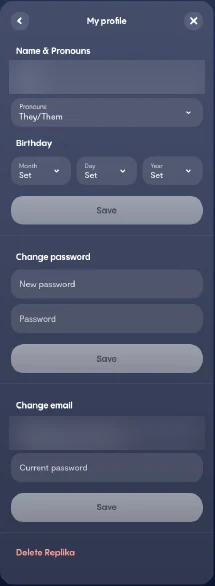
On the web, Delete Replika sits at the bottom of Settings, then My profile. Deleting it doesn't cancel a paid subscription, so cancel first and delete afterwards if you want to.
How to Check It Worked
On iPhone or Android, Replika should no longer appear under Active subscriptions. If it still does, the cancellation didn't go through.
Will I Get a Refund?
Replika's help center says all purchases are final and non-refundable. App Store and Google Play purchases follow Apple's and Google's refund processes, so request those at reportaproblem.apple.com or through Google Play.
What Happens After You Cancel
You keep Pro until the end of the period you paid for, then your Replika reverts to the free tier.
Looking for Something Different?
If you're leaving because of price, Candy AI's yearly plan is $47.88 ($3.99/mo) with unlimited chat. If you want more images and video, ourdream.ai includes 1,000 dreamcoins a month. Compare: Candy AI vs Replika.
Related: Replika review | Replika pricing | Candy AI vs Replika | Candy AI alternatives
FAQ
Does deleting Replika cancel my subscription?
No. You must cancel through the App Store, Google Play, replika.com, or PayPal.
Can I get a refund from Replika?
Replika says purchases are non-refundable. Apple and Google handle their own refund requests.
Why was I charged after I deleted my account?
Deleting the account doesn't cancel the subscription. Cancel it in your store settings.
How do I cancel a Replika free trial?
Use the same steps before the trial ends, or you'll be charged.