
Disclosure: This page contains affiliate links. Links to Candy AI and ourdream.ai are affiliate links: we may earn a commission if you sign up or buy through them, at no extra cost to you. Links to other apps are not affiliate links. Affiliate disclosure | Adults only (18+)
How to Cancel CrushOn.AI
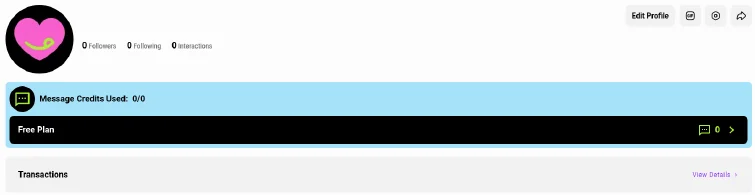
Short answer: on the website, start from Profile, where your plan bar and Transactions (your billing records) are. If you can't find a cancel option there, contact CrushOn support. If you subscribed in the iPhone or Android app, cancel through Apple or Google instead. Your plan runs until the end of the billing period.
Cancel on the Website
- Sign in at crushon.ai on a computer (the mobile site sometimes stalls).
- Open Profile from the left-hand menu.
- Click your plan bar (it shows your plan name) to manage your plan, then cancel and confirm. Transactions, just below it, lists your billing records.
- If you don't see a cancel option, contact CrushOn support (the Contact Us link on the Pricing page) and ask them to cancel before your renewal date.
- Check your email for the cancellation confirmation. Screenshot it.
Cancel on iPhone or iPad (If You Paid Through Apple)
Settings > your name > Subscriptions > CrushOn > Cancel Subscription.
Cancel on Android (If You Paid Through Google Play)
Play Store > profile icon > Payments and subscriptions > Subscriptions > CrushOn > Cancel.
What Happens After You Cancel
- Paid access lasts until your current billing period ends. No cancellation fee.
- You drop to the free plan: unlimited chat on CrushOn's Free Models, plus 100 message credits a month for Pro Models. Replies are capped at 225 characters and Ultra models aren't available.
- Free chat history is deleted after 7 days of inactivity, so export or copy anything you want to keep first.
Refunds
CrushOn doesn't publish a refund guarantee. If you were charged after cancelling or billed for the wrong plan, contact support right away. App store purchases are refunded through Apple or Google, not CrushOn.
Want Something Cheaper Instead?
- Candy AI: $47.88 a year ($3.99/mo) for unlimited chat, versus $58.88 a year for CrushOn Standard's 2,000 credits a month.
- ourdream.ai: $119.88 a year ($9.99/mo) for unlimited messages plus 1,000 dreamcoins a month for images and video.
Related: CrushOn.AI pricing | CrushOn.AI review | How to cancel Candy AI
FAQ
Does deleting my CrushOn account cancel my subscription?
Not reliably. Cancel the subscription first, then delete the account.
Can I cancel CrushOn in the app?
If you paid through Apple or Google, yes, through the store. Web subscriptions are cancelled on the website.
Does CrushOn charge a cancellation fee?
No.
Will I lose my characters?
You keep the account, but free history can be cleared after inactivity. Save what matters first.