
Disclosure: This page contains affiliate links. Links to Candy AI and ourdream.ai are affiliate links: we may earn a commission if you sign up or buy through them, at no extra cost to you. Links to other apps are not affiliate links. Affiliate disclosure | Adults only (18+)
How to Cancel GirlfriendGPT
Short answer: sign in, open your account page, go to the Subscription tab, click Manage subscription, and cancel. If you paid through CCBill, you can also cancel on CCBill's site. GirlfriendGPT's terms say paid subscriptions are not refunded, so cancel before the next renewal date.
What You'd Pay Elsewhere
| App | Per year | What you get |
|---|---|---|
| GirlfriendGPT Premium | $144 ($12/mo billed yearly) | 5,000 messages and 400 coins a month, voice messages |
| GirlfriendGPT Deluxe | $294 ($24.50/mo billed yearly) | Adds voice calls, 10-second videos and 2x memory |
| Candy AI | $47.88 | Unlimited chat, 100 tokens a month |
| ourdream.ai | $119.88 | Unlimited messages, 1,000 dreamcoins a month for images and video |
GirlfriendGPT prices checked Oct 26, 2026 on its plan page (signed in, US). See GirlfriendGPT pricing for every plan.
Cancel on the Website
- Sign in at gptgirlfriend.online. The GirlfriendGPT brand moved there, and girlfriendgpt.com redirects to it.
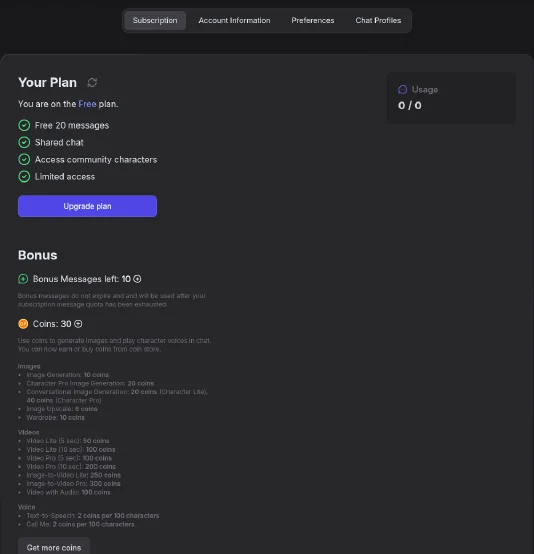
- Open your account page and choose the Subscription tab, which shows your current plan.
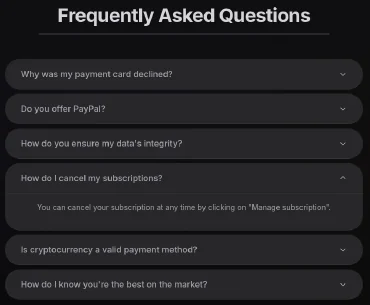
- Click Manage subscription, then cancel and confirm. GirlfriendGPT's FAQ says you can cancel at any time this way. Screenshot the confirmation.
Cancel Through CCBill or Your Payment Provider
If you paid by card through CCBill, you can cancel at CCBill's support site (support.ccbill.com) using the email on the receipt. If you paid through another provider, cancel with that provider or contact GirlfriendGPT support.
Cancel in the App Stores (If You Subscribed There)
iPhone: Settings > your name > Subscriptions > GirlfriendGPT > Cancel. Android: Play Store > Payments and subscriptions > Subscriptions.
What Happens After You Cancel
- Cancelling stops the next charge. It doesn't refund past charges.
- You keep paid access until the period ends, then drop to the free tier, which allows 20 messages.
- Unused coins may not carry over, so use them before the period ends.
Refunds
GirlfriendGPT's terms say it does not refund paid subscriptions, except for its own mistakes or technical problems. CCBill payments: request refunds from CCBill. Other payments: GirlfriendGPT support.
Want Something Cheaper Instead?
- Candy AI: $47.88 a year for unlimited chat, versus GirlfriendGPT Premium at $144 a year.
- ourdream.ai: $119.88 a year including images and video, versus $294 a year for GirlfriendGPT Deluxe, the tier that adds voice calls and 10-second videos.
Related: GirlfriendGPT pricing | GirlfriendGPT review | How to cancel Candy AI
FAQ
Does GirlfriendGPT give refunds?
Not for paid subscriptions, except for billing errors or technical faults.
Who runs GirlfriendGPT?
NextDay AI, according to the site. It lists a base in Montreal, Canada, a US company in Delaware and an EU company in Cyprus.
Does deleting my account stop billing?
Not reliably. Cancel first.
What is CCBill on my statement?
The payment processor GirlfriendGPT uses for card payments.